3CX AI receptionist: route, filter and leave no call unanswered
Routing by topic or by name, filtering sales calls, languages, fallback route: how to design the greeting of a 3CX AI receptionist with MLS.

For many companies, the switchboard is still the first point of contact with a customer, a supplier or a job applicant. The 3CX AI receptionist picks up immediately, understands what the caller wants and directs them to the right place. Following our introduction to 3CX AI agents, we focus here on a more practical question: how to design a greeting that routes accurately, screens out unwanted calls and provides a way forward for every situation, including when the AI itself stops responding.
The receptionist, the front door for your calls
The AI receptionist is the company-facing agent in 3CX. Its work resembles that of a switchboard operator: it greets the caller, listens, collects useful information such as their name, the reason for the call or a callback number, then transfers the call to the right person or department. It can also handle simple questions, take a message and screen out calls that have no business reaching you.
It does not replace the customer service agent, which tries to solve a problem using your content, or the personal assistant, which screens calls for a single person. Its domain is routing. That is precisely what makes it a good starting point: it is given a clear task whose result is easy to check. Did the call reach the right place, with the right information?
The receptionist relies on OpenAI to understand the caller and formulate its answers. It is configured in the 3CX management console: you assign it an extension number, one or more direct dial numbers, one or more departments, then define its behaviour.
Five decisions that make a good greeting
The quality of an AI receptionist depends less on the technology than on the choices made during configuration. Here are the ones we review with our clients.
1. An identity and a voice consistent with your company
The receptionist has a first name and a last name, chosen by you, which are displayed and spoken during the call. You also choose a voice style, the presentation language and the greeting message. The tone follows that of your company: a law firm, a medical practice and a garage do not speak to their customers in the same way. We recommend stating clearly, within the first few seconds, that the caller is talking to a virtual assistant.
As for languages, the receptionist recognises the caller's language and can reply in it, if language switching is enabled. In French-speaking Switzerland, French is generally the greeting language, with German, English or Italian depending on your clientele. Each language offered must be tested with realistic calls.
2. Topic-based routing described without ambiguity
The heart of the configuration is the set of topic-based routing rules. Each rule describes, in everyday language, a type of request and the corresponding destination. For example: if the caller reports a connection outage, transfer the call to technical support. These descriptions must be clear and must not overlap. If “complaint” and “contract” lead to two different teams, you need to explain where the boundary lies, otherwise the agent will hesitate just as a poorly briefed new colleague would.
We start from the real reasons for calls, not from the organisation chart. A customer does not know which department handles their request; they know what is happening to them. The rules should therefore use the customer's own words.
3. Transfer by name, and its limits
Callers can also ask for a specific person: “Could you put me through to Ms Rochat?”. When this option is enabled, the receptionist looks up the employee in the 3CX directory and transfers the call. According to 3CX, the latest update improves this search in large organisations, even when the caller slightly mispronounces a name.
Before enabling this option, three questions need to be asked. Who can be reached directly this way, and who should not be? What happens with people who share the same name? Where does the call go when the requested person is absent? For very busy executives, the 3CX AI personal assistant offers finer screening.
4. Filtering unwanted calls
Protection against unwanted calls is enabled by default. You define what counts as unwanted or fraudulent, for example sales calls, robocalls or scam attempts, and then the action to take: end the call, transfer it, send a summary before hanging up, or send an email before hanging up.
A filter that is too broad also harms customer relations: a supplier, a job applicant or a journalist may be mistaken for a salesperson. During the first few weeks, we recommend favouring actions that leave a trace, such as the summary or the email, and regularly reviewing the calls that were screened out.
5. Difficult situations
Some calls fall outside the normal scope. The receptionist must know what to do with an aggressive or exasperated caller, with a caller who does not answer or stalls the conversation, and before transferring: 3CX can check that the destination is available before starting the transfer. For each of these situations, you choose what happens next: transfer to a person, voicemail or ending the call.
Finally, the agent's base instructions can be adapted: tone, behaviour, rules specific to your business, what the agent must do and what it must never do. We adjust these instructions carefully, testing each change.
Planning for when the AI does not respond
A reliable greeting does not rely on AI alone. Two situations must be distinguished, and they are configured in two different places.
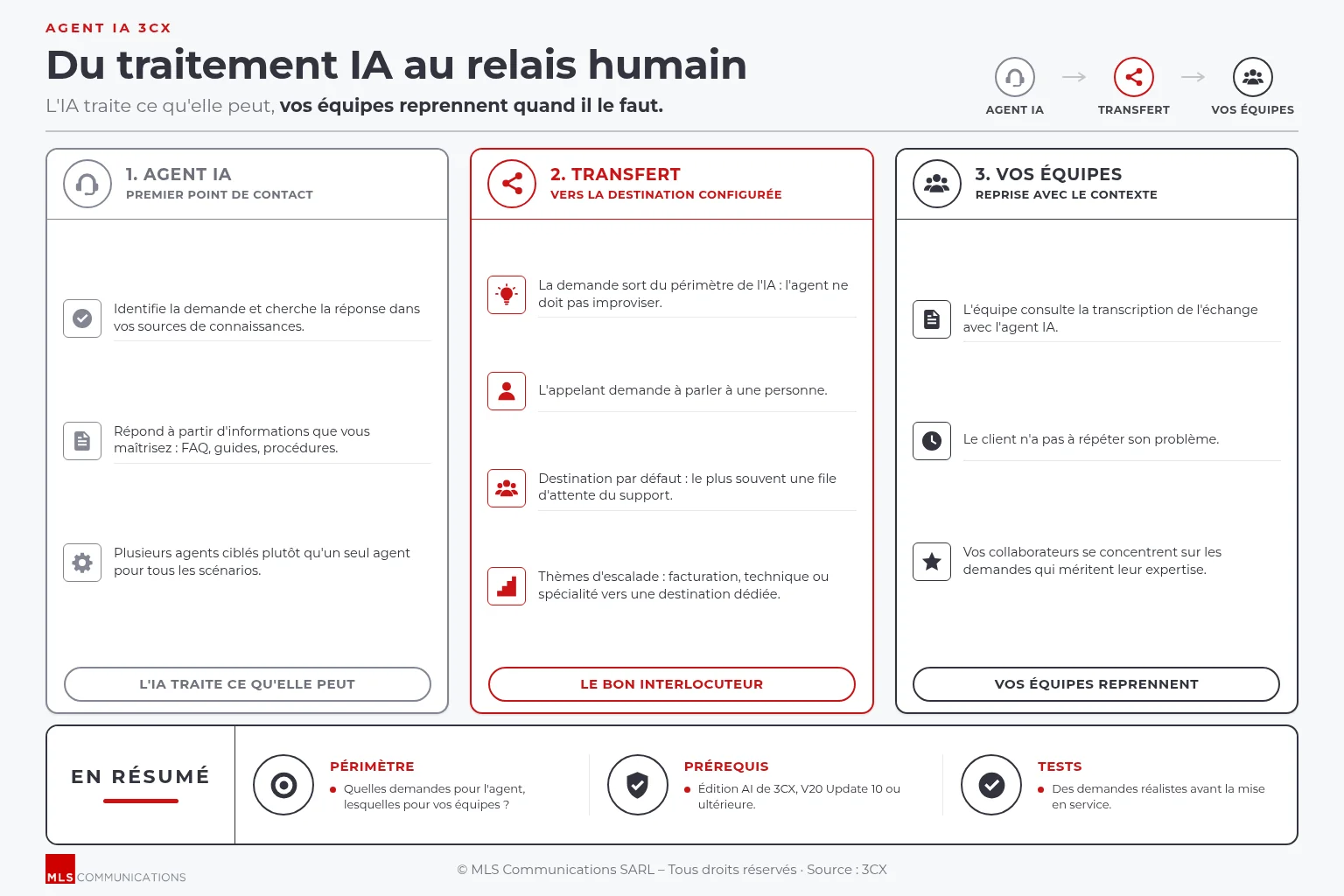
- The AI is working, but the request goes beyond what it can handle, or the caller wants to speak to someone: the call is transferred to the planned destination, a person or voicemail.
- The AI cannot answer at all, for example because of a network outage at the AI provider or an authentication problem: 3CX then sends the call to a fallback destination, such as a queue or a ring group.
Since V20 Update 10, this fallback route is explicitly provided for. It does not verify itself, however: a successful transfer during a conversation does not prove that the fallback route works. 3CX recommends testing it separately, on a test system, by simulating an AI provider outage, then repeating this test after every configuration change. This is what we do before any go-live, with separate destinations for each case so that we know exactly which route was taken.
Call duration and channels: check on the version in use
On these two points, the information published by 3CX is not entirely consistent, and we prefer to say so.
- Call duration: the product page states a maximum duration of three minutes per call. The configuration documentation presents the maximum duration as an agent setting, and V20 Update 10 announces better handling of long conversations.
- Voice or text: the product page specifies that the receptionist handles voice only. The documentation does, however, mention a conversation link that lets people reach the agent from a website in one click, including in writing.
We check these points on the version of 3CX we operate for you before finalising the scenario. In any case, a receptionist is not meant to hold long conversations: its task is to route callers quickly.
What we bring
MLS Communications is a telecom operator specialising in unified communications: 3CX, Microsoft Teams and Centrex. As a 3CX partner and reseller, we support SMEs, practices, retailers and public authorities in French-speaking Switzerland. For an AI receptionist, our consulting service covers four areas.
- Analysis of your incoming calls: frequent reasons for calling, volumes by time of day, languages, unwanted calls, and how your switchboard, queues and IVR currently work.
- The greeting scenario: identity, voice, greeting message, routing rules by topic and by name, filtering, difficult situations, fallback route, consistent with your opening hours and cantonal public holidays.
- Tests in real conditions: accents, background noise, proper names and place names, Swiss-format numbers, ambiguous requests, out-of-hours calls and a simulated AI provider outage.
- Operation and follow-up: reviewing samples of calls, adjusting rules and instructions, and supporting 3CX updates.
Your 3CX system is hosted and operated by us, in colocation at nLighten in Meyrin, in the canton of Geneva, under our terms.
Data and security
The 3CX AI receptionist works with OpenAI. According to 3CX, exchanges between 3CX and OpenAI use encrypted HTTPS connections, and the administrator retains control over access keys and usage. Since V20 Update 10, 3CX also supports xAI Grok as a provider; only one provider can be active at a time. We always tell you which one is configured on your system.
The phone system is hosted in Switzerland, in Meyrin, but speech recognition and the wording of answers are handled by the AI provider. Under the Federal Act on Data Protection (FADP), several points deserve examination before go-live:
- informing callers, from the greeting onwards, that they are talking to an AI;
- the disclosure of data abroad, linked to where the AI provider processes it;
- the recording of calls handled by the agent, which is configured separately, and how long recordings, summaries and messages are kept;
- data minimisation: the receptionist should only ask for what is needed to route the call;
- sensitive data, particularly for medical practices, law firms or social services.
These points are areas for examination, not legal advice. We provide the technical information on data flows; validation is up to your data protection advisor or legal counsel.
Where to start
- List the ten most frequent reasons for calling and the appropriate destination for each.
- Choose a limited initial scope: out-of-hours calls, overflow at peak times or a single incoming line.
- Write the routing rules using your customers' words, then have them reviewed by the teams who will receive the calls.
- Define the fallback route and test it before go-live.
- After a few weeks, compare planned and actual transfers, and correct any overlapping rules.
Frequently asked questions
What is the 3CX AI receptionist?
A virtual switchboard operator built into 3CX. It answers incoming calls, understands the request thanks to OpenAI and automatically routes the call to the right person or department.
Can it replace a receptionist?
It takes over the repetitive tasks of the front desk: greeting, routing, collecting information. Your staff keep the complex, delicate or relationship-critical conversations. In practice, it relieves more than it replaces.
Does it work outside opening hours?
Yes. It answers day and night, weekends included. You still need to decide what it offers when nobody is available: a message, voicemail or a callback.
Can you choose its voice and language?
Yes. You choose the voice style, the presentation language and the greeting message. If the caller speaks another language, the receptionist recognises it and can reply in that language to route them or present the available options.
What happens if it cannot handle a call?
The call goes to the planned destination: an employee or voicemail. If the AI itself stops responding, a separate fallback route sends the call to a queue or a group. We test both cases.
Is it secure?
According to 3CX, exchanges with OpenAI use encrypted HTTPS connections and the administrator controls the access keys. The system is hosted and operated by MLS in Meyrin. Data protection questions still need to be examined case by case; see the “Data and security” section.
Does it also handle written exchanges?
The 3CX product page states that the receptionist handles voice only, while the documentation describes a link that lets people reach the agent from a website, including in writing. We check what is available on your version before including it in the project.
How long can a call with the receptionist last?
The product page mentions a maximum of three minutes per call. The documentation presents this duration as a setting, and the latest update announces better handling of long conversations. We confirm the limit that applies on your system. For a routing task, a few dozen seconds are usually enough.
Can callers ask for a person by name?
Yes, if the option is enabled. It then looks up the employee in the 3CX directory. We define with you who can be reached this way and what happens when someone is absent.
How does it screen out sales calls?
Unwanted call filtering is enabled by default. You describe what should be considered unwanted and choose the action: end the call, transfer it, or send a summary before hanging up. Regular reviews prevent good contacts from being turned away.
Can you have several receptionists?
Yes. You can create several agents, tailored to different departments, sites or language markets, each with its own numbers, rules and greeting message.
Review your phone greeting with us
Would you like to know how an AI receptionist would fit into your switchboard? We offer a demonstration based on a scenario close to yours, or an audit of your incoming calls to define the routing rules, filtering and fallback route.
Request a demonstration or an audit
Source: 3CX.